Sign in and set up your team
Use this page when your firm is getting ready to use Torrens for the first time.
Before you start
Section titled “Before you start”- Use your firm-approved Torrens account.
- You need a firm admin account to invite users or change access.
- If you are not a firm admin, ask a firm admin to complete the team setup steps.
- Make sure the right people in your legal team have access before a live Transaction depends on them.
- Use firm-controlled email addresses. Do not invite personal email accounts for firm work.
- Sign in to Torrens with your approved account.
- If you are a firm admin, open your firm settings.
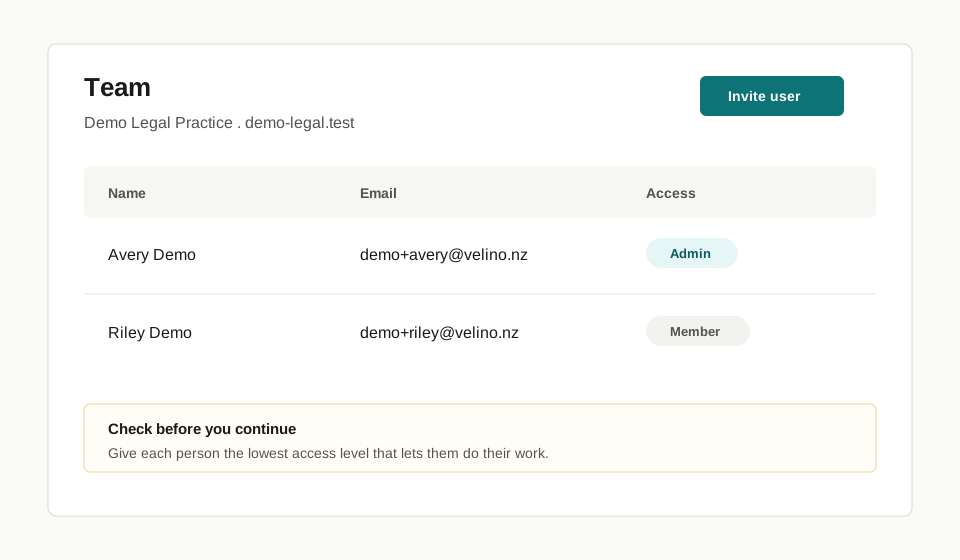
- Check the team list.
- Invite the people who need to prepare, review, approve, or supervise work.
- Give each person the lowest access level that lets them do their work.
Check before you continue
Section titled “Check before you continue”- Lawyers and delegated staff should be clear about who can prepare work and who can approve it.
- Firm leaders should check that former staff and wrong-firm users are not active.
- Non-admin users may be able to see their account but not invite users or change access.
- Support staff can help prepare a Transaction, but legal responsibility does not move away from the lawyer or firm.
What happens next
Section titled “What happens next”Once the team is ready, create or open a Transaction. Start with Create your first transaction.
Limits
Section titled “Limits”Firm access controls do not replace your firm’s internal supervision duties. Torrens helps record and route work; your firm remains responsible for deciding who may act, review, and approve.